Stat Tagging Reference
Stat tagging connects each clip to what actually happened in the point. Tags drive the automatic scoreboard in the editor, power the stats screen in Broadcast Studio, and give your highlight reel context beyond just “here's a cool rally.”
How Tagging Works
Select a clip, then click a stat button in the Stats panel or press the matching number key. Some stats ask which players were involved before they're saved.
Every tagged clip shows its stat on the filmstrip, and CutServe moves on to the next untagged clip. Untagged clips stay Pending. You don't have to tag every clip to export, but the score, scoreboard and stat screen are only as accurate as your tags.
Stat Types
An unreturnable serve: the receiver has no reasonable chance to set it. The serving team wins the point.
Two consecutive service faults. The point goes to the receiving team.
The serving team wins the point because of serve pressure: the return is weak or forced by the quality of the serve.
A clean return with no rally. The receiving team wins the point and gets the serve back.
A rally with at least one defensive touch (by either team), won by the serving team. You'll be asked to log the touch sequence in order.
A rally with at least one defensive touch (by either team), won by the receiving team. The difference from a Defensive Break is which team wins: Break = serving team, Hold = receiving team. Log the touch sequence the same way.
An unforced error by a specific player, such as a bad set, a missed hit, or a net violation. You pick who made it, then optionally log any defensive touches before it.
Marks the clip as reviewed without assigning a stat. Useful for clips you want to keep that don't fit another category. It doesn't change the score.
Tagging Players for Defensive Stats
When you choose Defensive Break, Defensive Hold or Error, a player picker opens in the Stats panel. Players are numbered 1–4, so you can tag the whole sequence from the keyboard.
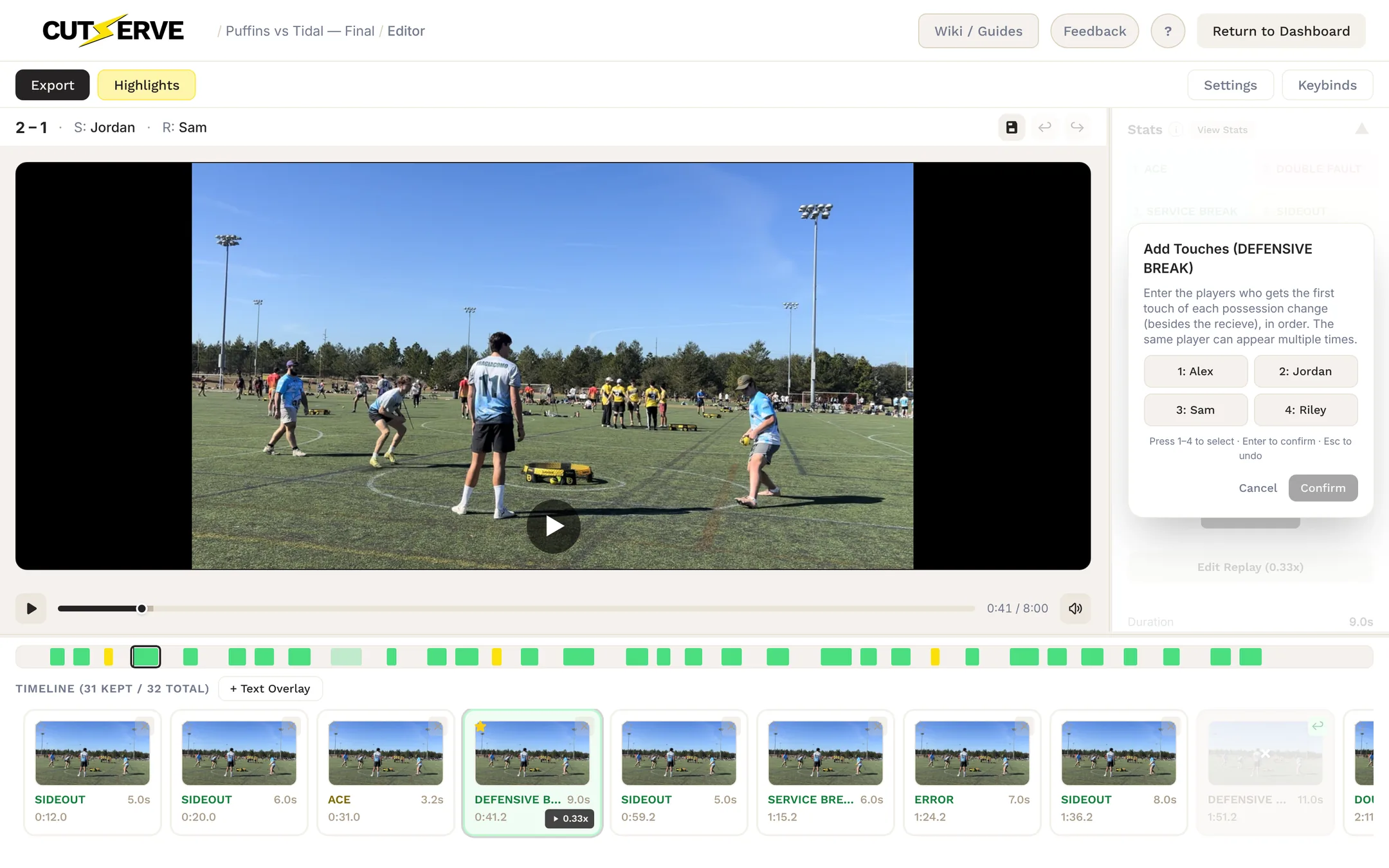
- For Error: press the number of the player who made the mistake (this confirms it), then press 1–4 for any defensive touches before the error, in order. Skip that step if there were none.
- For Defensive Break / Hold: press the player who got the first touch of each possession change (besides the receive), in order. The same player can appear more than once. Press Enter to confirm the sequence or Esc to undo the last touch.
How Tags Become RPR
CutServe tracks who serves and receives every point from the serve rotation, so each tag credits the right players automatically. Those stats roll up into each player's rating (RPR), shown on the stat screen and in the Broadcast Pro and Worlds scoreboards.
| Serving | 5.5 × Aces + 15 × (Serves On ÷ Total Serves) |
| Hitting | 20 × (Successful Hits ÷ Total Hits) |
| Defense | 0.4 × Hitting RPR × Defensive Touches Returned + Defensive Touches Not Returned |
| Efficiency | max(0, 20 − 5 × Errors − 2 × Times Aced) |
| Total RPR | 1.57 × (Serving + Hitting + Defense + Efficiency) |
On the scoreboard, the server's RPR reflects their standing going into the point, not after it.
Keyboard Shortcuts for Tagging
Press <kbd1/> through <kbd8/> with a clip selected to apply that stat instantly. If the stat needs players, the picker opens automatically and takes 1–4 as well, so tagging stays on the keyboard.
Quick Reference