Replay Studio
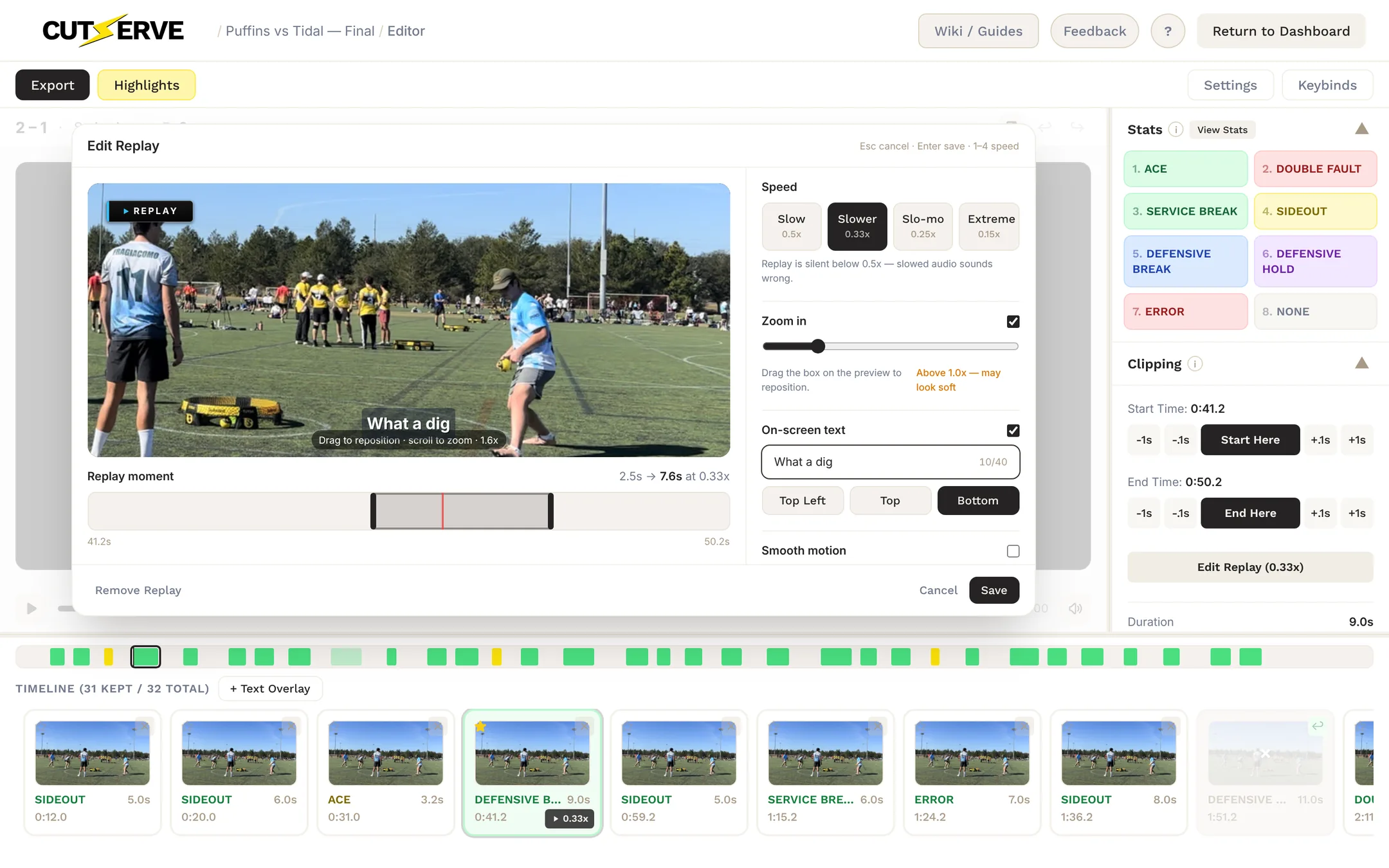
Replay Studio adds a slow-motion replay to any point. The replay plays right after the point in your export, with a REPLAY badge, optional zoom and an optional caption. What you see in the Studio preview is what renders.
Adding a Replay
In the editor, select a clip and press R or click Add Replay in the Clipping panel. Each clip can have one replay. Clips with a replay show a speed badge (for example 0.33x) on their filmstrip card; click it to edit.
Choosing the Moment
The Replay moment bar under the preview shows the clip. Drag the handles to choose the part to replay; the label shows the source length and how long it lasts at the chosen speed. A replay covers up to 5 seconds of footage.
Speed
Pick one of four speeds:
| Speed | Playback |
|---|---|
| Slow | 0.5× — half speed, with audio |
| Slower | 0.33× — silent |
| Slo-mo | 0.25× — silent |
| Extreme | 0.15× — silent |
Zoom
Turn on Zoom in to push in on the action. Drag the box on the preview to reposition it, and scroll or use the slider to change the zoom. If you zoom in further than the footage's resolution supports, the Studio warns you that it may look soft.
On-screen Text
Turn on On-screen text to add a caption of up to 40 characters, such as "What a dig". Place it Top Left, Top or Bottom.
Smooth Motion
Smooth motion generates in-between frames instead of repeating them, for a smoother slow-motion look. It makes the export much slower and isn't shown in the preview.
In the Export
Replays are included automatically when you export from Broadcast Studio:
- The replay plays immediately after its point, with the REPLAY badge.
- Replays use the same zoom and timing as the Studio preview.
Editing or Removing a Replay
- Select the clip and press R (or click its speed badge). The Studio opens as Edit Replay.
- Change anything and click Save, or click Remove Replay to delete it.
Keyboard Shortcuts
| Key | Action |
|---|---|
| R | Open Replay Studio for the selected clip |
| 1/2/3/4 | Choose a speed (Slow, Slower, Slo-mo, Extreme) |
| Enter | Save the replay |
| Esc | Cancel |